パスファインディングは、キャラクターやオブジェクト(エージェント)が障害物を避けながら目的地に到達するための論理的な経路に沿って移動するプロセスであり、危険な材料や定義された領域を避けることもできます。
ナビゲーションの可視化
パスファインディングのレイアウトとデバッグを支援するために、スタジオはナビゲーションメッシュと修飾子ラベルをレンダリングできます。これらを有効にするには、3Dビューポートの右上隅にある可視化オプションウィジェットからナビゲーションメッシュとパスファインディング修飾子をオンにします。

ナビゲーションメッシュが有効になっていると、色分けされた領域がキャラクターが歩いたり泳いだりできる場所を示します。小さな矢印は、キャラクターがジャンプして到達しようとする場所を示します。

実装
パスファインディングは、PathfindingServiceとその関連メソッド(CreatePath()など)を通じてさまざまな方法で実装できますが、このセクションではプレイヤーのキャラクターのための次のパスファインディングスクリプトを使用します。
読みながらテストするには:
- 重要エクスプローラーでStarterPlayerコンテナを選択します。次に、プロパティウィンドウで、DevComputerMovementModeとDevTouchMovementModeの両方をScriptableに設定します。

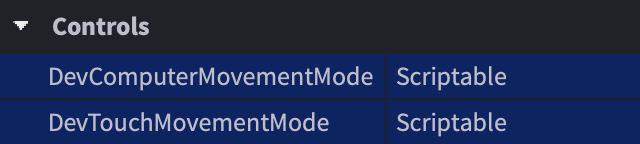
次のコードをLocalScript内のStarterCharacterScriptsにコピーするか、このパッケージを取得してStarterCharacterScriptsにドロップします。
PlayerPathFollow (LocalScript in StarterCharacterScripts)local PathfindingService = game:GetService("PathfindingService")local Players = game:GetService("Players")local RunService = game:GetService("RunService")local DESTINATION = Vector3.new(20, 0.5, 20)local GROUND_WAIT = 0.01local VELOCITY_MULTIPLIER = 0.0625local path = PathfindingService:CreatePath({AgentCanClimb = true,Costs = {Water = 20}})local character = script.Parentlocal humanoid = character:WaitForChild("Humanoid")local waypointslocal nextWaypointIndexlocal blockedConnectionlocal currentWaypointReachedConnectionlocal currentWaypointPlaneNormal = Vector3.zerolocal currentWaypointPlaneDistance = 0local pathfinderWorking = falselocal function disconnectCurrentWaypointReachedConnection()if not currentWaypointReachedConnection then return endcurrentWaypointReachedConnection:Disconnect()currentWaypointReachedConnection = nilendlocal function isCurrentWaypointReached()if humanoid.FloorMaterial == Enum.Material.Air thenreturn falseendlocal reached = falseif currentWaypointPlaneNormal ~= Vector3.zero then-- Compute the distance from humanoid to destination planelocal dist = currentWaypointPlaneNormal:Dot(humanoid.RootPart.Position) - currentWaypointPlaneDistance-- Compute the component of the humanoid velocity that is towards the planelocal velocity = -currentWaypointPlaneNormal:Dot(humanoid.RootPart.Velocity)-- Compute the threshold from the destination plane based on humanoid velocitylocal threshold = math.max(1.0, VELOCITY_MULTIPLIER * velocity)-- Consider waypoint reached if less then threshold in front of the planereached = dist < thresholdelsereached = trueendif reached thencurrentWaypointPlaneNormal = Vector3.zerocurrentWaypointPlaneDistance = 0moveToNextWaypoint()endendlocal function calculateNextWaypointApproach()nextWaypointIndex += 1if nextWaypointIndex > #waypoints thenreturn falseendlocal currentWaypoint = waypoints[nextWaypointIndex - 1]local nextWaypoint = waypoints[nextWaypointIndex]-- Build destination plane from next waypoint towards current onecurrentWaypointPlaneNormal = currentWaypoint.Position - nextWaypoint.Position-- Set normal perpendicular to Y plane when not climbing upif nextWaypoint.Label ~= "Climb" thencurrentWaypointPlaneNormal = Vector3.new(currentWaypointPlaneNormal.X, 0, currentWaypointPlaneNormal.Z)endif currentWaypointPlaneNormal.Magnitude > 0.000001 thencurrentWaypointPlaneNormal = currentWaypointPlaneNormal.UnitcurrentWaypointPlaneDistance = currentWaypointPlaneNormal:Dot(nextWaypoint.Position)endreturn trueendlocal function resetWaypointData()humanoid:Move(Vector3.zero)currentWaypointPlaneNormal = Vector3.zerocurrentWaypointPlaneDistance = 0disconnectCurrentWaypointReachedConnection()pathfinderWorking = falseendlocal function waitForGround()while humanoid.FloorMaterial == Enum.Material.Air dotask.wait(GROUND_WAIT)endendfunction moveToNextWaypoint()if calculateNextWaypointApproach() thendisconnectCurrentWaypointReachedConnection()currentWaypointReachedConnection = RunService.Heartbeat:Connect(isCurrentWaypointReached)local nextWaypointPosition = waypoints[nextWaypointIndex].Positionlocal nextWaypointAction = waypoints[nextWaypointIndex].Actionhumanoid:Move(nextWaypointPosition - humanoid.RootPart.Position)if waypoints[nextWaypointIndex + 1] and waypoints[nextWaypointIndex + 1].Label == "UseBoat" thennextWaypointIndex += 1-- Call your own customized function to make agent use the boatelseif nextWaypointAction == Enum.PathWaypointAction.Jump thenhumanoid:ChangeState(Enum.HumanoidStateType.Jumping)while humanoid.FloorMaterial ~= Enum.Material.Air dotask.wait(GROUND_WAIT)endhumanoid:Move(nextWaypointPosition - humanoid.RootPart.Position)endelseresetWaypointData()endendlocal function findStartingPoint(waypoints)nextWaypointIndex = 1while nextWaypointIndex + 1 <= #waypoints dolocal dist = waypoints[nextWaypointIndex + 1].Position - humanoid.RootPart.Positiondist = Vector3.new(dist.X, 0, dist.Z)if dist.magnitude >= 2 thenreturnendnextWaypointIndex += 1endendlocal function followPath()-- Compute the pathpathfinderWorking = truewaitForGround()local success, errorMessage = pcall(function()path:ComputeAsync(character.PrimaryPart.Position, DESTINATION)end)if not success or path.Status ~= Enum.PathStatus.Success thenwarn("パスが計算されていません!", errorMessage)returnend-- Get the path waypointswaypoints = path:GetWaypoints()-- Detect if path becomes blockedblockedConnection = path.Blocked:Connect(function(blockedWaypointIndex)-- Check if the obstacle is further down the pathif blockedWaypointIndex >= nextWaypointIndex then-- Stop detecting path blockage until path is re-computedblockedConnection:Disconnect()resetWaypointData()-- Call function to re-compute new pathfollowPath()endend)findStartingPoint(waypoints)moveToNextWaypoint()endfollowPath()パス計算とキャラクター移動について学ぶために、次のセクションに進みます。


パスの作成
パスファインディングは、PathfindingServiceとそのCreatePath()メソッドを通じて開始されます(
| キー | 説明 | タイプ | デフォルト |
|---|---|---|---|
| AgentRadius | エージェントの半径(スタッド単位)。障害物からの最小の分離を決定するのに役立ちます。 | 整数 | 2 |
| AgentHeight | エージェントの高さ(スタッド単位)。この値より小さい空間(階段の下の空間など)は通行不可としてマークされます。 | 整数 | 5 |
| AgentCanJump | パスファインディング中にジャンプが許可されているかどうかを決定します。 | ブール値 | true |
| AgentCanClimb | パスファインディング中にTrussPartsを登ることが許可されているかどうかを決定します。登れるパスにはLabelがClimbという名前で付けられ、登れるパスのコストはデフォルトで1です。 | ブール値 | false |
| WaypointSpacing | パス内の中間ウェイポイント間の間隔。math.hugeに設定すると、中間ウェイポイントはありません。 | 数値 | 4 |
| Costs | 通行のコストを持つ材料または定義されたPathfindingModifiersのテーブル。エージェントが特定の材料/領域を他のものより好むようにするのに役立ちます。詳細については修飾子を参照してください。 | テーブル | nil |
パス計算
CreatePath()で有効なパスを作成した後、Path:ComputeAsync()を呼び出して、開始点と目的地の両方にVector3を指定して計算する必要があります(

Pathが計算されると、開始から終了までのパスをトレースする一連のウェイポイントが含まれます。これらのポイントは、Path:GetWaypoints()メソッドを使用して取得できます(

パス移動
各PathWaypointは、Position(Vector3)とAction(PathWaypointAction)の両方で構成されています。通常のRobloxキャラクターのようにHumanoidを含むキャラクターを移動させる最良の方法は、ウェイポイントからウェイポイントへHumanoid:Move()を呼び出し、スクリプトのisCurrentWaypointReached()コールバック(
ブロックされたパス
多くのRobloxの世界は動的です。部品が移動したり落下したり、床が崩れたりすることがあります。これにより、計算されたパスがブロックされ、キャラクターが目的地に到達できなくなる可能性があります。これに対処するには、Path.Blockedイベントに接続し、何がブロックしているかの周りでパスを再計算します(
パスファインディング修飾子
デフォルトでは、Path:ComputeAsync()は開始点と目的地の間の最短パスを返しますが、ジャンプを避けようとします。これは、いくつかの状況では不自然に見えます。たとえば、パスが水を通過することが幾何学的に短いために水の周りを回避するのではなく、沼地の水を通過することがあります。

パスファインディングをさらに最適化するには、さまざまな材料を横断するスマートなパスを計算するためにパスファインディング修飾子を実装するか、定義された領域の周りを回避するか、障害物を無視することができます。
材料コスト
TerrainおよびBasePart材料を使用する場合、CreatePath()内にCostsテーブルを含めて、特定の材料を他の材料よりも通行しやすくすることができます。すべての材料にはデフォルトコストが1であり、任意の材料はその値をmath.hugeに設定することで通行不可として定義できます。
Costsテーブルのキーは、Enum.Material名を表す文字列名である必要があります。たとえば、Enum.Material.WaterのWaterや、Enum.Material.CrackedLavaのCrackedLavaなどです。
local PathfindingService = game:GetService("PathfindingService")
local Players = game:GetService("Players")
local RunService = game:GetService("RunService")

local DESTINATION = Vector3.new(20, 0.5, 20)
local GROUND_WAIT = 0.01
local VELOCITY_MULTIPLIER = 0.0625

local path = PathfindingService:CreatePath({
	AgentCanClimb = true,
	Costs = {
		Water = 20, CrackedLava = 100, Slate = 20
	}
})領域の設定
場合によっては、材料の好みだけでは不十分です。たとえば、キャラクターが足元の材料に関係なく定義された領域を避けるようにしたい場合があります。これは、パートにPathfindingModifierオブジェクトを追加することで実現できます。
領域の周りにAnchoredパートを作成し、そのCanCollideプロパティをfalseに設定します。

パートにPathfindingModifierインスタンスを挿入し、そのLabelプロパティを見つけて、DangerZoneのような意味のある名前を割り当てます。
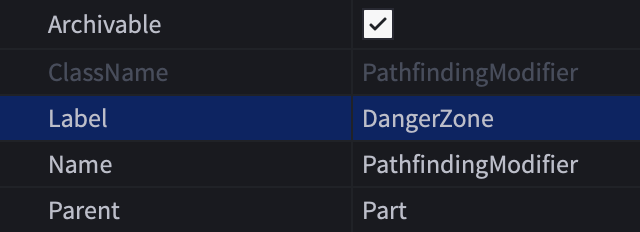
CreatePath()のCostsテーブル内に一致するDangerZoneキーと関連する数値を含めます。修飾子は、その値をmath.hugeに設定することで通行不可として定義できます。
PlayerPathFollow (LocalScript)local PathfindingService = game:GetService("PathfindingService")local Players = game:GetService("Players")local RunService = game:GetService("RunService")local DESTINATION = Vector3.new(20, 0.5, 20)local GROUND_WAIT = 0.01local VELOCITY_MULTIPLIER = 0.0625local path = PathfindingService:CreatePath({AgentCanClimb = true,Costs = {DangerZone = math.huge, Water = 20, CrackedLava = 20, Slate = 20}})


障害物を無視する
場合によっては、固体の障害物を通過するようにパスファインディングを行うことが有用です。これにより、特定の物理的ブロッカーを通過するパスを計算でき、計算が完全に失敗することはありません。
オブジェクトの周りにAnchoredパートを作成し、そのCanCollideプロパティをfalseに設定します。

パートにPathfindingModifierインスタンスを挿入し、そのPassThroughプロパティを有効にします。
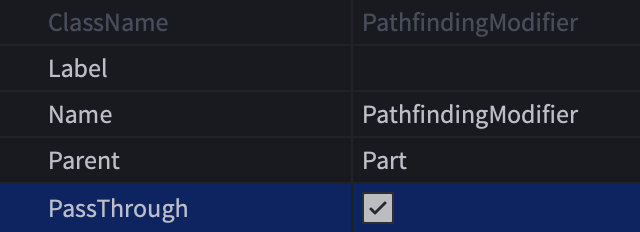
これで、ゾンビNPCからプレイヤーキャラクターへのパスが計算されると、パスはドアを越えて延び、ゾンビにそれを通過させることができます。たとえゾンビがドアを開けられなくても、キャラクターがドアの後ろにいるのを「聞く」かのように反応します。


パスファインディングリンク
時には、通常通行できない空間を横断するパスを見つける必要があり、次のウェイポイントに到達するためにカスタムアクションを実行する必要があります。これは、PathfindingLinkオブジェクトを通じて実現できます。
上記の例を使用して、エージェントがボートを使用するようにすることができます。

この例を使用してPathfindingLinkを作成するには:
ボートの座席とボートの着地点の近くに2つのAttachmentsを作成します。

LabelプロパティにUseBoatのような意味のある名前を割り当てます。この名前は、エージェントが開始リンクポイントに到達したときにカスタムアクションをトリガーするためのフラグとしてパスファインディングスクリプトで使用されます。
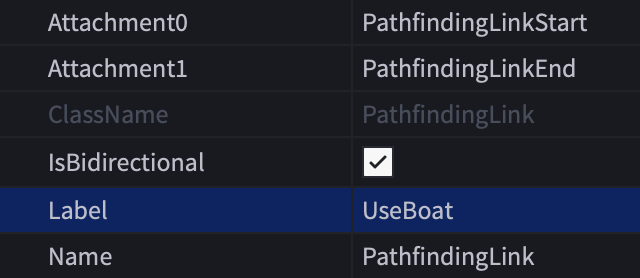
CreatePath()内にWaterキーとLabelプロパティ名に一致するカスタムキーを含むCostsテーブルを追加します。カスタムキーには、Waterの値よりも低い値を割り当てます。
PlayerPathFollow (LocalScript)local PathfindingService = game:GetService("PathfindingService")local Players = game:GetService("Players")local RunService = game:GetService("RunService")local DESTINATION = Vector3.new(20, 0.5, 20)local GROUND_WAIT = 0.01local VELOCITY_MULTIPLIER = 0.0625local path = PathfindingService:CreatePath({AgentCanClimb = true,Costs = {UseBoat = 2, Water = 20}})moveToNextWaypoint()関数内(
LINES 93–114)で、Label修飾子名のカスタムチェックを使用して、Humanoid:Move()とは異なるアクションを取ることができます。この場合、エージェントをボートに座らせ、ボートを水の上に移動させ、ボートの着地点でエージェントを降ろし、その後エージェントのパスを最終目的地に続ける関数を呼び出すことができます。


ストリーミング互換性
ゲーム内のインスタンスストリーミングは、プレイヤーのキャラクターが世界を移動する際に3Dコンテンツを動的に読み込み、アンロードする強力な機能です。彼らが3D空間を探索するにつれて、新しいサブセットが彼らのデバイスにストリーミングされ、既存のサブセットの一部がストリーミングアウトすることがあります。
ストリーミング対応ゲームでPathfindingServiceを使用するためのベストプラクティスを考慮してください:
ストリーミングは、キャラクターがパスに沿って移動する際に特定のパスをブロックまたはブロック解除することがあります。たとえば、キャラクターが森を走っている間に、木が彼らの前にストリーミングされてパスを妨げることがあります。ストリーミングとシームレスに連携させるために、ブロックされたパスの処理技術を使用し、必要に応じてパスを再計算することを強くお勧めします。
パスファインディングの一般的なアプローチは、既存のオブジェクトの座標を計算に使用することです。たとえば、パスの目的地をワールド内の既存のTreasureChestモデルの位置に設定します。このアプローチは、サーバーが常に世界を完全に把握しているため、サーバー側のScriptsと完全に互換性がありますが、クライアントで実行されるLocalScriptsやModuleScriptsは、ストリーミングされていないオブジェクトへのパスを計算しようとすると失敗する可能性があります。
この問題に対処するには、永続的モデル内のBasePartの位置に目的地を設定することを検討してください。永続モデルはプレイヤーが参加した後すぐに読み込まれ、決してストリーミングアウトしないため、クライアント側のスクリプトはPersistentLoadedイベントに接続し、イベントが発火した後にウェイポイントを作成するためにモデルに安全にアクセスできます。
制限と失敗要因
パスファインディングエンジンには、効率的な処理と最適なパフォーマンスを確保するための特定の制限があります。さらに、パスファインディングの計算は、以下に示すさまざまな理由で失敗する可能性があります。